
ArtinSoft’s Visual Basic 6.0 Upgrade Assessment Tool

The VB 6.0 Upgrade Assessment Tool, built by ArtinSoft, works as a measuring instrument for an application conversion effort. This tool analyzes the application components and the relationships between them from a migration perspective, which considers elements, constructs, and features that consume significant resources during an upgrade project.

The main goal of the VB Upgrade Assessment Tool is to analyze Visual Basic 6.0 projects and obtain information useful for planning the conversion to Visual Basic .NET and for estimating the migration effort. This tool will generate a group of reports that are used as a basis for further calculations related to task effort and cost. The Assessment Tool user can specify configuration values that will override the initial estimation inputs; in this way, the assessment tool can be adapted to specific organizations.

The Assessment Tool analyzes the original application using a Visual Basic 6.0 parser that takes into account all the projects specified by the user. The obtained data is then processed to identify usage patterns and features that are difficult to upgrade. After all these features are classified and counted, a series of reports with detailed and summarized data is generated.

The Assessment Tool generates two Microsoft Excel files. This first one is called MainReport.xls and contains all the configuration settings and summaries of the effort estimates. The second report, called DetailedReport.xls, is linked to the previous one, and it shows detailed information about the content of the application.

Architecture Analysis

The original application architecture and project types are identified by the Assessment Tool, and it is analyzed in order to extract all referenced files and components. The dependences between projects are also considered when assessing project groups.

The Assessment Tool can analyze the following Visual Basic 6.0 project types:

  • Standard EXE: Standard features and functionality are considered when making estimations that are based on average productivity values.
  • Internet Information Services (IIS) application: The application is analyzed in the standard way.
  • Application that uses distributed components: The usage of distributed functionality is identified and accumulated to estimate the upgrade cost of this feature.

Visual Basic 6.0 project groups are collections of related projects that can share resources and functionality. The Assessment Tool is able to process project groups that are combinations of the preceding project types. Shared components are identified and taken into consideration when generating the Recommended Upgrade Order report. The migration path to be followed during the project depends on the relationships between the base components, which are analyzed by the assessment tool to produce an upgrade order suggestion.

Inventory to Upgrade

The first aspect to be considered in the application analysis is the inventory of resources and components involved in the upgrade process, which includes modules, third-party components, and intrinsic components. Some of these components are user-defined, and their implementation needs to be upgraded in addition to the source code that uses them. For third-party and intrinsic components it is necessary to migrate the code that accesses the corresponding component; in this case, for assessment purposes, it is relevant to make an inventory of the class members and other elements that are used in the application.

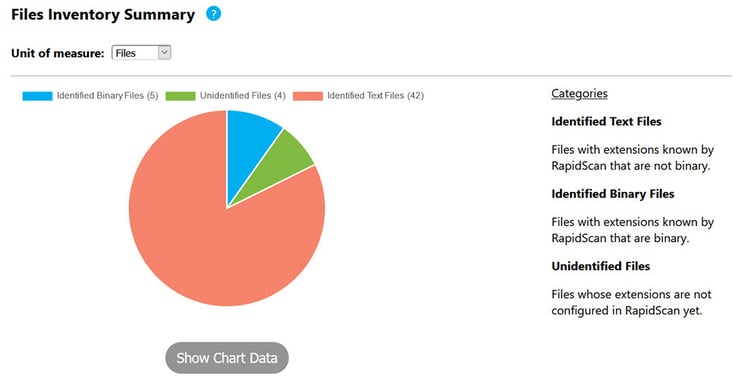
The Project Files Overview report, from the DetailedReport.xls file, presents the projects that were processed by the Assessment Tool and the quantity of the different types of modules included in each project. This report can be useful to identify projects with different types of functionality; for example, projects that provide user interface elements (with a high percentage of form modules) or projects that implement the business logic functionality (with a high percentage of classes and modules).

User components account for a significant percentage of the migration effort; as a consequence, the inventory of user component definitions and instances declared must be taken into consideration when determining the inventory of resources to upgrade. The User Components Summary report considers all user-defined components and the lines of code (LOC) contained in each of them. This report also presents the quantity of instances of each class that are declared in the rest of the user code.

Third-party and Visual Basic 6.0 intrinsic components are also considered in the application inventory to be upgraded. The conversion of these components involves the processing of the application source code to identify accesses to each of the component members. All member usages will be analyzed to determine if there is an equivalent member in the target environment; some of these members will not have an equivalent in Visual Basic .NET and will require additional manual work to be upgraded to .NET. The Third Party Component Summary report, from the DetailedReport.xls file, includes all the components used in the application and the quantity of instances that are created for each class.

Visual Basic 6.0 intrinsic components are treated in a similar way to third-party components, with the exception that most of the intrinsic components have an equivalent in the .NET Framework and most of the member accesses require some type of transformation. The inventory of intrinsic components used in the application is included in the Visual Basic Intrinsic Components Summary report generated by the Assessment Tool.

User COM objects are also included in the inventory to upgrade; the quantity of occurrences will be considered for effort and cost estimations. It is important to notice that user COM objects will be considered as third-party components when accessed from a project different from that in which it was declared. In the case of user-defined components, there is an important percentage of upgrade effort dedicated to the processing of the components’ internal code, including member declarations and usage of features that have a high upgrade cost. Detection of these features is done by the Assessment Tool, including API calls, Data Access technologies (ADO, RDO, DAO) and COM+ and Microsoft Transaction Server (MTS) classes.

Using the information presented in these reports, it is possible to identify components of the application that require special attention in the upgrade planning. For example, heavy use of ADO recordsets is an indication that a vertical upgrade strategy should be used for the affected components. For more information about upgrade planning and strategies, see http://migrationguide.artinsoft.com/Migration-Guide-Faq-Chapter-2.aspx and http://migrationguide.artinsoft.com/Migration-Guide-Faq-Chapter-4.aspx.

Source Code Metrics

Typically, the size of an application is defined in terms of the lines of code. Also, the application source code can be classified and counted according to the origin of the code; for example, the Assessment Tool is able to identify code lines related to visual component declarations, comments, blank lines, and user-written code. The quantity of lines of code has some limitations as an estimate of the complexity of an application from the upgrade perspective. For example, a large application that uses only features supported by the Upgrade Wizard, the VB to .NET migration tool built by ArtinSoft that ships with Microsoft’s Visual Studio .NET, can have a low migration effort, while a small application that makes extensive use of unsupported features can have a high conversion cost. However, source code metrics can still be used to estimate the size and effort necessary to execute some tasks involved in the upgrade process. These tasks have a limited complexity and depend mainly on the size of the application and the quantity of modules and components that form it. Examples of these tasks are the Application Resource Inventory and the Migration Order Definition; both of these are estimated in the Effort – Total report generated by the Assessment Tool.

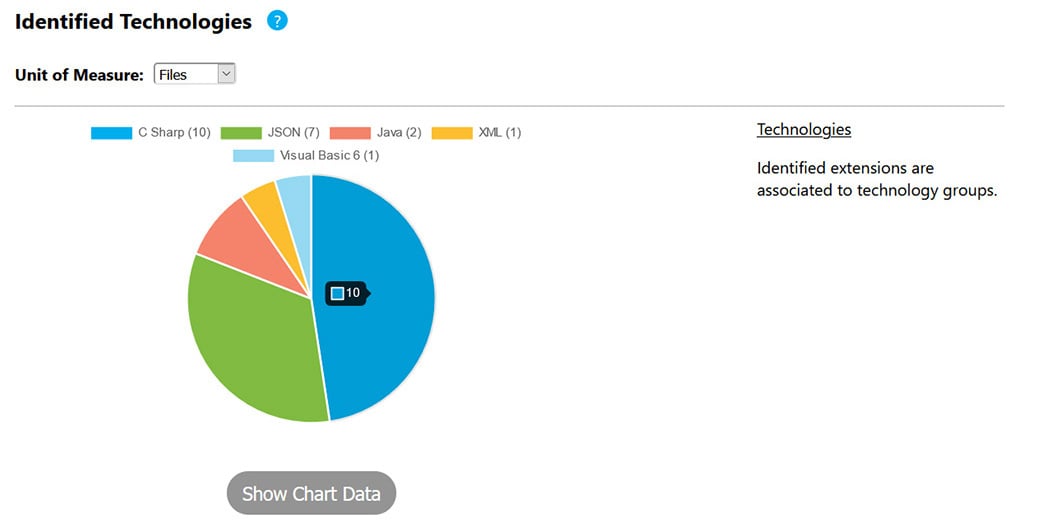
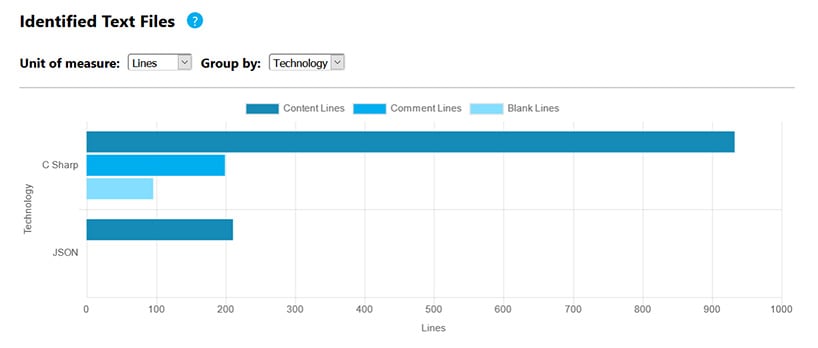
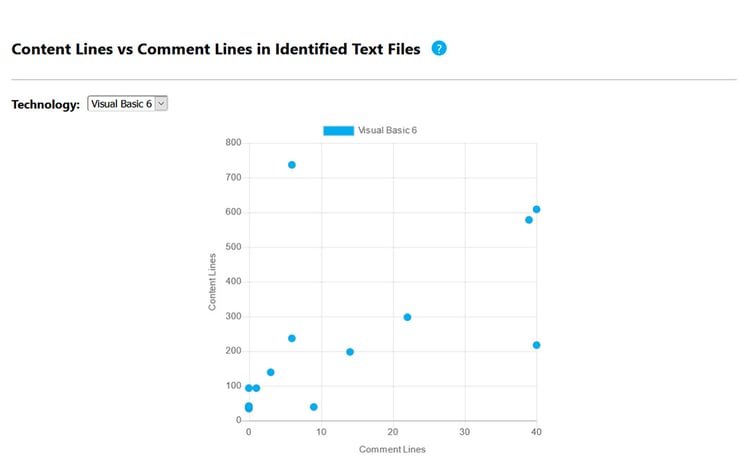
The assessment tool helps to capture source code metrics by producing a report of the number of lines of code in a project (Lines of Code (LOC) report, in the DetailedReport.xls file). Source code lines are classified by the Assessment Tool as a result of analyzing all the content of the application modules. Each line is parsed and classified to determine how many visual lines, code lines, and comment lines are written in the Visual Basic 6.0 projects processed. Visual lines are lines that were generated by Visual Studio.

Handling Unsupported Features

The Upgrade Wizard automatically converts most of the language constructs and intrinsic components. It also supports third-party components and different types of Visual Basic 6.0 projects. However, there are still features that are not fully supported by the upgrade engine and require some level of manual work to be migrated to Visual Basic .NET. ArtinSoft’s Visual Basic Upgrade Companion supports many features that are not handled by the Upgrade Wizard, not to mention the ability to be customized further.

When an application is upgraded, the unsupported features produce different types of errors in the target application. Compilation or run-time errors can be produced and user intervention will be required to fix them; this results in the need for resources to review the code, perform the correction, and execute the appropriate tests.

The Visual Basic 6.0 Upgrade Assessment Tool detects the unsupported features by analyzing the code and searching for code patterns that will produce migration issues after the application is converted. The estimation worksheet has a Config – EWI tab where the values associated with each issue can be reviewed and adjusted according to specific needs. The values that are initially inserted in this tab are derived from ArtinSoft’s experience in Visual Basic upgrade projects. The configuration values are taken into consideration when generating the Effort – EWIs tab in the MainReport.xls report file. This tab reports all the detected issues and the corresponding quantity of occurrences and their complexities. It is important to take into consideration that the Assessment Tool does not detect all possible issues that can be generated by the Upgrade Wizard; however, most of the issues that have a significant impact on the migration effort are considered.

Application Dependencies

The VB 6.0 Upgrade Assessment Tool identifies the dependencies between the application components analyzing different aspects of the source code, including:

  • Application references: Explicit references to user components indicate that there is a dependence relationship between different user projects.
  • Variable declarations: When a variable is declared using a type that is defined in a different module or project, a dependence relationship between different modules or projects is established.
  • Member accesses: Member accesses also produce dependences between subroutines, functions, or properties.

The Assessment Tool identifies dependencies between members of project groups. When a project references another project that forms part of the same project group, the Assessment Tool identifies the referenced project as a user component and informs the user about the relationship between these projects.

Knowledge about the usage relationships between components is essential for different aspects of the migration plan, including upgrade order definition, testing, and debugging. For more information about upgrade planning, see http://migrationguide.artinsoft.com/Migration-Guide-Faq-Chapter-5.aspx

Based on the dependence relationships analysis, the Assessment Tool generates an Upgrade Order report in the DetailedReport.xls file that includes a suggestion of the file conversion order. The report is divided into sections that correspond to each of the application’s projects. The files in each group are ordered according to the dependences between the files in the group. The first file in each group has no dependences on other user-defined files in the same group. As a result, this file can be upgraded and tested independently. The next file in the list can be upgraded and tested based on the previous converted file.

Each of these files can be upgraded in a staged way, providing increasing levels of functionality. The Assessment Tool produces the Upgrade Order report by looking for modules that depend on the minimum quantity of user components, and then a new dependency level is generated based on the components included in the previous level. In this way, each level is built on the functionality provided by previous levels. This report is useful for identifying possible migration paths; if a horizontal upgrade strategy is going to be used, the suggested conversion order can be followed. It is also possible to migrate modules from different groups at the same time if a vertical upgrade strategy will be executed for some pieces of the application.

Missing Application Elements

After the initial upgrade preparation steps are complete, it is possible that some of the application components are not yet available on the computer where the automated migration is going to take place. After these components are identified, it will be necessary to correct the environment before the upgrade process can be restarted. These additional steps will consume time and resources that need to be accounted for.

The Assessment Tool identifies missing application elements that can be reviewed in the Missing Components and Missing Files reports included in the estimation worksheet. Missing elements are identified according to the user defined modules and explicit references included in the analyzed projects.

The Missing Components report includes the file name and path of the missing components in addition to the corresponding version and the registered name. It is necessary to install these components on the upgrade computer to execute the automated migration. The quantity of missing components is considered in the effort estimation (Effort – By Tasks tab in the MainReport.xls file produced by the Assessment Tool) according to the missing elements configuration data.

The Missing Files report includes the file name, path, and module type for each missing file. The project where the missing file is detected is also included. In the same way that the missing components are considered in the estimation effort, missing user files are also considered.

Effort Estimation

Estimating migration projects is traditionally a very difficult thing to get right. After the most important tasks are known, you must decide how much time each task will require. On the other hand, ArtinSoft can provide a much better estimation through its Ready program.

This is a 5-day onsite consulting engagement through which an ArtinSoft’s expert performs a thorough assessment of the business and technical environment of your systems, including the size, complexity, migration goals, and testing procedures for your current application.

Through a combination of interviews with your team and both automated and manual inspections of your source code, ArtinSoft creates an optimized plan for the migration, identifying critical issues and providing recommendations for the target architecture.

There’s also a fixed-cost proposal and a project schedule, if you want ArtinSoft to perform the whole migration for you, or even an optimal customization analysis in case you want to licence ArtinSoft’s Visual Basic Upgrade Companion product. Even if you opt to tackle the actual migration without ArtinSoft’s help, you'll find the results of the Ready program valuable in understanding the scope of the task and some of the issues you’ll face.