Visual Basic 6.0 or C# to the Cloud
Move your strategic Visual Basic 6.0 or C# assets straight to the Cloud
With a proven track record of thousands of legacy applications successfully migrated
to .NET, ArtinSoft offers a proven solution to move your Visual Basic 6.0 and C#
code to the Platform as a Service (PaaS) components of Windows Azure. Our technology
and services combination will ensure a virtually risk-less transition of your business
critical applications to the Microsoft cloud in the most cost-effective way.
At the core of ArtinSoft’s technology, developed on the principles of Artificial
Intelligence, there is a very powerful source code semantic manipulation engine.
This engine allows for the understanding of programs and the transformation of some
of their properties on a massive scale.
With the advent of Azure as a cloud platform, ArtinSoft offers services to accelerate
the porting of VB 6.0 or C# applications to Windows Azure. Using the same core principles
to any ArtinSoft solution, applications are architecturally transformed to take
advantage of the platform benefits while at the same time ensuring functional equivalence.
How does it Work?
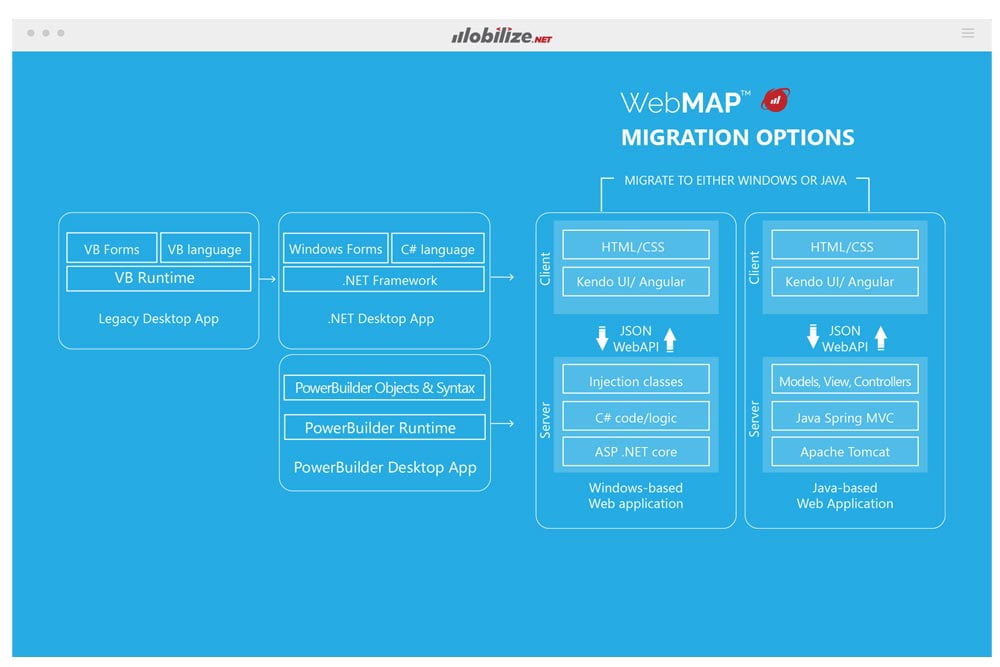
ArtinSoft’s approach to cloud enablement contains different steps as illustrated
in the following diagram:
-
Application analysis: the first step is to perform a full analysis of all the source
code to understand where a transition to the cloud adds value and what are the costs
associated with it. In particular, the following steps need to be taken:
- Determine Application Architecture: Azure PaaS components require certain architectural
characteristics from an application. During this analysis, ArtinSoft determines
the current state of the application, focusing on the typical layers (GUI, Business
Logic, Data), and identifies a migration path.
- Determine Current Code Issues: After the architecture has been revised, the next
level down is to focus on specific code issues that may not be directly compatible
with Azure. For example, an application should not have a dependency on machine
state. All the code issues are detected and a solution is proposed.
- Determine the desired migration path and required re-architecture: Once the source
portion of the application is understood, ArtinSoft works with the customer to understand
its business issues. The outcome is a full migration plan that includes all the
time and cost details. It is important to mention that not all of the application
needs to be moved to Azure at once. Mixed scenarios can be accomplished depending
on the specific business needs.
- Determine Data migration needs: Based on the business needs, a strategy to move
data to the cloud is assessed and a recommendation is issued. A typical scenario
involves a combination of on-premise data with data that will be stored on SQL Azure,
Azure Table Storage and Azure Blob Storage.
-
Re-architect to web features: An Azure PaaS application typically follows general
web architectural patterns. In this step, the application components are transformed
in such a way that they can be deployed on Azure. For example, if an application
is written in VB6, first it needs to be moved to .NET. Another scenario is when
an application is monolithycal, and then it needs to be adjusted to take full advantage
of Azure characteristics.
In general, the following re-architectures are typical sample scenarios:
- GUI: WinForms or VB6 Forms to either Silverlight, click once deployment, ASP.NET,
HTML 5, etc.
- Business Logic: In general the business logic will be converted to Azure Web and/or
Worker roles.
- Data: All of the data access technologies (DAO, RDO, ADO, ADO.NET) will be reviewed
and converted to SQL Azure / Azure Storage.
-
Move to “clean” Azure compute and maintain functional equivalence: Once
the general architecture of the application has been set to run on Azure then each
of the components needs to be cleaned up so that they conform to Azure programming
patterns. A sample list of issues that are automatically reviewed and then converted
to obtain clean Azure compute elements is as follows:
-
Move data to Azure: In this step the data structures that will be moved to the cloud
are transformed and prepared for the transition. It is important to note that any
impact on the application behavior due to data migration is taken into account to
ensure Functional Equivalence. Typical patterns that are taken into account in this
stage are:
- Analysis for data partitioning: If the customer’s database is larger than
50GB, then it is necessary to partition it, and at the same time ensure the necessary
changes in the application to maintain functionality.
- File System to Blob Storage: Data stored in the file system can be moved to Azure
Blob Storage.
- Other RDBMS to SQL Azure: If the application uses a RDBMS that is not SQL Server,
DB migration is required as part of the Azure implementation.
- Database to Table Storage for data archiving: Historic data can be stored in a more
cost-efficient way using Azure Table Storage. This scenario requires data migration
and application modifications to maintain functionality.
-
Provide basic improvement with application blocks: Once the application has been
modified to run in the cloud but and functional equivalence has been achieved, additional
functionality to better exploit the Windows Azure properties can be included. For
example, basic auto scaling (horizontal, vertical, time pattern…), queued services,
diagnostic and logging, support for access control service can all be included in
a semi-automatic way.
Support for Windows Phone 7 can be added once the application has been re-architected
and a service layer has been deployed. Users can build new UI and connect to the
entire infrastructure now hosted in the cloud.
-
Deploy on Azure: The application has been migrated and the next step is to deploy
it on Azure. ArtinSoft supports its customers during the final transition to ensure
all the necessary setup is performed and the application can be executed correctly.
Engaging with ArtinSoft
Learn more about how our expert consulting services can aid your organization to
web-enable applications or move them to the cloud by completing our
Contact Us form, request a services quote,
or sending us an email to info@artinsoft.com.
One of ArtinSoft’s representatives will contact you back in one or two business
days.