Visual Basic Upgrade Companion Enterprise Edition

Visual Basic Upgrade Companion Assessment Mode

Migrate Visual Basic 6.0 applications to .NET quickly and easily

System Requirements

Requeriment Description
Processor 1.5 GHz or higher
Memory

150 MB of available hard disk space for installation.

Additional disk space will be required during the upgrade process. The requirements will vary from one application to another depending on the total size of the source code being upgraded. The recommended is at least four times the size of the VB6 source code.

Display 800x600 or higher screen resolution recommended (for graphical user interface)
Operating systems
  • Microsoft Windows 2000 with Service Pack 3 (SP3)
  • Microsoft Windows XP with Service Pack 2 (SP2)
  • Microsoft Windows Vista Business (SP1)
Software Requirements
  • Microsoft .NET framework 2.0 or later
  • Visual Studio 2005 or Visual Studio 2008 Professional Edition
  • .NET Framework 2.0 SDK must be installed*

* The .NET Framework 2.0 Software Development Kit (SDK) can be installed in two ways:
  • For Visual Studio 2005 installations, select the “.NET Framework SDK->Tools” option during the setup process.
  • For Visual Studio 2008 users, the SDK is not included and must be installed separately for either x86 or x64, depending on your operating system architecture.
Others Considerations Visual Basic files that will be upgraded must be version 6.0.

Installation Instructions

  • Download and launch the installer (“VBUC.8.0.exe”).
  • Read and accept the license agreement.
  • Select the installation folder and authorized users (“Everyone” or “Just me”).
  • Wait for the installation to complete.
  • Activating the Trial Mode:
    • Copy the VBUC license file (*.lic) that was sent to you via email. Save it in the installation folder or use the VBUC Installer’s file browser dialog to locate it. This will allow you to convert 10,000 lines of code for evaluation purposes. The trial is valid for a period of 1-month after you download it.
    • If a license file is not available, or once it expires, the VBUC will run in assessment mode. The VBUC can be activated later by copying a valid license file to the installation folder.

See the step-by-step installation guide

Running the VBUC

  • Run the Visual Basic Upgrade Companion from Start > Program Files > Artinsoft Visual Basic Upgrade Companion.
  • Read the “Getting Started” guide that can be found in our companion technical site VB to NET

Executing an Assessment

The process for executing an assessment is very similar to running a full conversion. For the Visual Basic Upgrade Companion to perform a thorough analysis of the Visual Basic 6.0 code, Perform the following steps:

  • 1.Open VBUC
  • 2.Create a new Upgrade Solution

    Create a New Upgrade Solution

  • 3.Fill the upgrade solution required information and press “OK”
    • 3.1.Solution Name
    • 3.2.Source Path: path where the Visual Basic 6.0 code is located
    • 3.3.Output Path: Folder where the upgraded code will be generated (by default the VBUC creates a new folder called “SourceFolderName_UpgradedCode” in the same directory level of  the source code)
    • 3.4.It is recommendable that you solve any warning generated by files or dependencies that could be missing.  These warnings (if any) would be marked by a red exclamation sign in the VBUC main screen, and most of them can be solved by registering missing libraries.

    Upgrade Solution Properties

  • 4.Resolve Migration Warnings following the process detailed on this page
  • 5.Go to the “Upgrade” option in the main menu of the VBUC, choose the option Assessment (or press the F4 key)
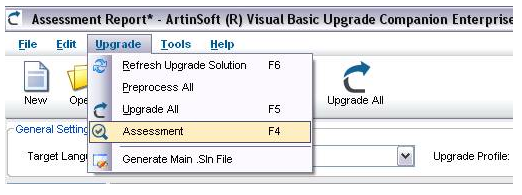
    Select Upgrade - Assessment

  • 6.Wait until the assessment process finishes
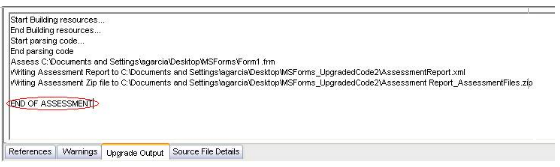
    Upgrade Assessment Mode Output

  • 7.Go to the Output Path folder defined in the Step # 1 and there you will see a zip file called Assessment_Report_AssessmentFiles.zip, please send this file to ArtinSoft

    Assessment Report

Assessment Report

Once the Visual Basic Upgrade Companion completes the assessment, it will create several files with important assessment information from the original VB6/ASP source files. The assessment output files are:

  • Upgrade Solution (*.VBCSln)
    • Used to solve:
      • Internal and external References
      • Project dependencies
  • LOC Report.xml
    • Source files per project
    • Recommended upgrade order
    • Lines of code report (code, comments, spaces, design lines)
      • Per Project
      • Each file detail
  • AssessmentReport.xml
    • Used by ArtinSoft personnel for estimations.
    • Included Information:
      • Third party controls
        • Used methods and properties
        • Events
      • Data Access components
      • COM+ summary and members
      • Intrinsic Components
      • Windows API calls
      • Much More

Important notes

  • The VBUC works best when the project you migrate is completely self contained. Organize your VB6 projects into a single folder, with as many subfolders as you want. The VBUC has the ability to migrate multiple projects for better results.
  • Make sure the source application or subset of your project to be migrated compiles and runs in Visual Basic 6.0 before attempting the upgrade. Do a full compile (Ctrl+F5) of the project instead of a normal compilation (F5). The VBUC needs all the references to all the third party components, as well as any library that is part of the project.

    The VBUC Assessment can be executed on code that doesn’t compile or is missing referenced third party libraries. This, however, affects the quality of the generated assessment information, since the VBUC will not be able to determine the correct references and to analyze the properties, methods and events used from each projects. This may result in incomplete information that will affect the accuracy of the analysis and subsequent estimates.

Additional Resources

Download Visual Basic Upgrade Companion Assessment Mode